Issue 01
High manual effort
Every cycle started with gathering data by hand from fragmented sources: plant-to-plant dependencies, packaging flows, lane data.
WorkAI Network Optimizer
AI Network Optimizer (0→1) | Unilever
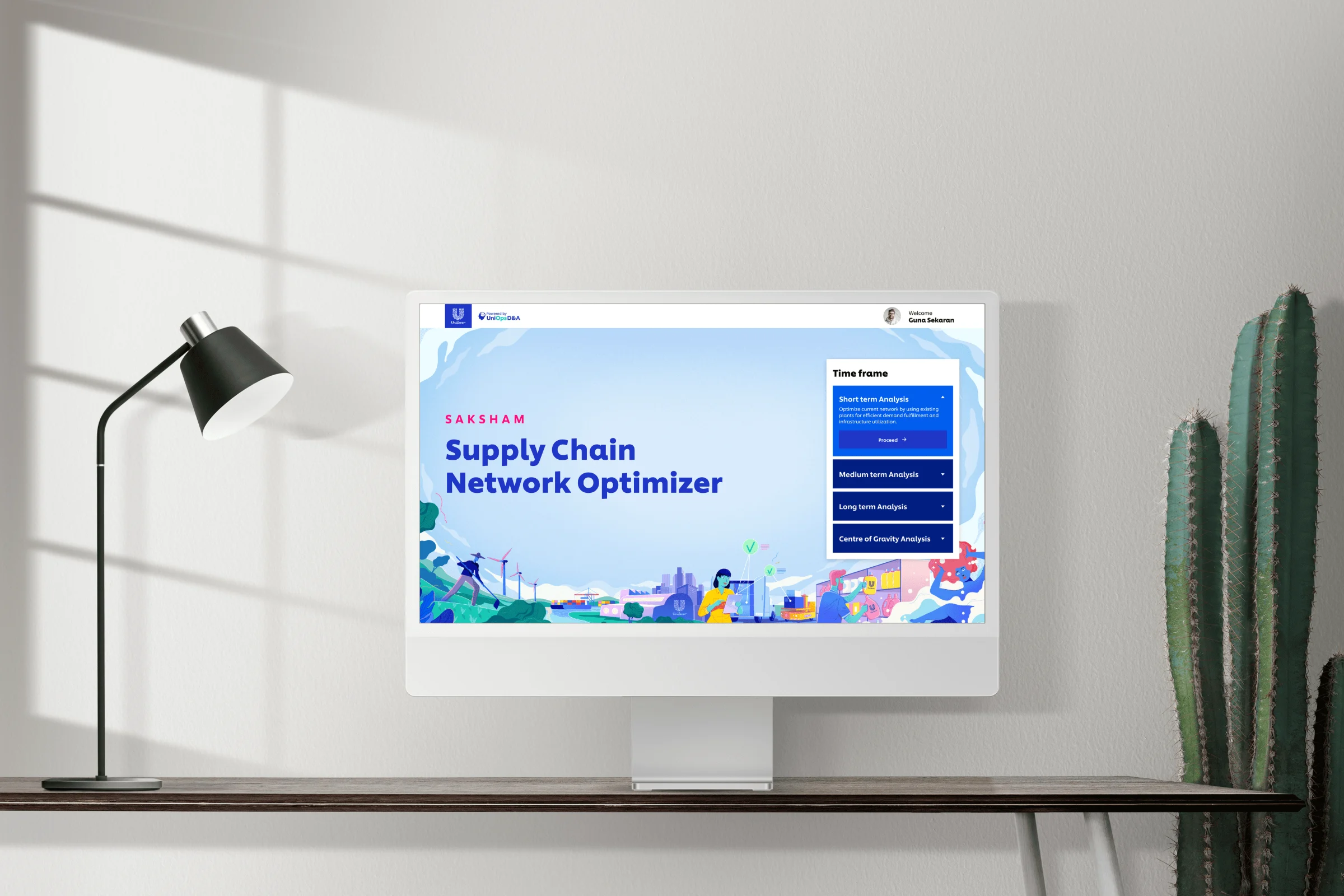
Network Optimizer is an AI planning tool for Unilever India's transportation planners. It replaces the spreadsheet process for costing inbound shipping routes.
 Figma
Figma FigJam
 Excel
Excel Word
WordOutcome & impact
Got a minute?
Planners already knew the routes. They couldn't prove which one was cheapest. I designed a 0→1 tool that shows them the cheapest option and leaves the final call with them.
With it, planners consistently uncover cost-saving opportunities, refine route decisions with confidence, and produce execution-ready shipping plans with far less manual effort.
Planners built inbound shipping plans in spreadsheets every month and quarter. Each cycle took days of data gathering and validation. It still couldn't tell them whether a cheaper route existed.
I led UX for this 0→1 MVP as the only designer, from early alignment to developer-ready designs. I worked with Product, Engineering and Data Science to turn optimization logic into a workflow planners could trust, within real limits on model explainability and data readiness.
Context
The opportunityFind more efficient routes and show the true cost of every shipping decision, without heavy manual planning.
Why · the problem
Issue 01
Every cycle started with gathering data by hand from fragmented sources: plant-to-plant dependencies, packaging flows, lane data.
Issue 02
The same workflow ran monthly for execution and quarterly for forecasting. Nothing carried over, so nothing got faster.
Issue 03
Formula-driven costing was error-prone and hard to audit. The plan got finished, but it never showed whether a cheaper route existed.
=IFERROR(VLOOKUP(B12,'Lanes (2)'!A:F,6,0)*D12,"CHECK")| A | B | C | D | E | F | |
|---|---|---|---|---|---|---|
| 1 | Lane | From | To | Qty (t) | Rate / t | Cost |
| 11 | L-208 | PL-03 | DP-11 | 1,240 | 2,180 | 27,03,200 |
| 12 | L-211 | PL-03 | PK-02 | 860 | #N/A | CHECK |
| 13 | L-214 | PK-02 | DP-07 | 1,050 | 1,940 | #REF! |
| 14 | L-219 | PL-05 | DP-11 | ?? | 2,410 | #VALUE! |
| 15 | L-221 | PL-05 | DP-04 | 720 | 2,050 | 14,76,000 |
| 16 | L-226 | PK-04 | DP-04 | 1,310 | 1,860 | 24,36,600 |
RE: RE: FW: updated depot volumes (use this one)
Plant ops · 11:48 PM
Attached the latest. Please ignore the file from Tuesday, the packaging numbers were wrong.
depot_volumes_v3.xlsx
EXPORT_ZMM_INB_0625.csv
MATNR;WERKS;LGORT;MENGE;MEINS
10045;PL03;DP11;1240;TO
10045;PL03;PK02;0860;TO
10071;PL05;;1050;TO
10071;PL05;DP04;0720;TO
check row 214 again??
Users
They plan the inbound network for Unilever India's supply chain. Their plans go to a logistics manager, who reviews and approves each one and needs confidence in the AI output.
Users
Transportation and logistics plannersUnilever India · Supply chain operations
Proto-persona

Senior Transportation Planner · Unilever India
Persona typeThe Meticulous Planner
Built from recurring planner feedback, not interviews.
I already know the network. I just need a faster way to prove which route is actually the best, and to show the numbers to my manager.
Arjun has managed inbound logistics across Unilever India for close to a decade. He builds monthly shipment plans and quarterly forecasts by routing flows between plants, packaging units, depots and suppliers. He knows the network deeply, but most of his time goes into calculations he knows could be automated.
Core tensionCost control, planning speed and delivery reliability. Arjun balances all three every cycle, with no tool that shows him the trade-offs clearly.
Research
This MVP had no dedicated research phase. The planning cycles themselves were the research: the same friction came up every month and every quarter.
Source 01
The same friction surfaced in every monthly and quarterly cycle, which gave a clear signal on what mattered most.
3 monthly cycles and 1 quarterly cycle
What it told usWhich steps were most effort-heavy and error-prone.
Source 02
Cross-functional alignment sessions with stakeholders across the supply chain.
3 sessions with planners, the logistics manager, the product owner and data science
What it told usWhere planning broke down across the supply chain.
Source 03
6 spreadsheet audits of past monthly plans
What it told usMost errors started in manual lookups between tabs, and validation alone added 2–3 days to every cycle.
This gave us clear direction on scope quickly, without waiting for formal research. The recurring nature of the pain points meant the signal was already rich and validated by operational reality.
Before
Gather data from plants, depots, suppliers and lanes.
PainData scattered across emails and SAP exports, in inconsistent formats.
Map lanes: processing → packaging → depots.
PainNetwork complexity makes this slow and repetitive every month.
Compute inbound costs with formula-driven sheets.
PainError-prone and hard to audit. Errors stay hidden until downstream.
Cross-check outputs against source data several times.
PainMore time verifying than optimizing.
Lock the execution plan and the quarterly pre-plan.
PainNext month starts from scratch, with no reuse and no learning.
Steps 03 and 04 were the bottleneck. Planners spent more time checking numbers than improving them.
Core insight
Planners didn't need help finding routes. They already knew them. The question they had to answer every month was:
“Are we shipping in the most cost-efficient way possible, given our real network constraints?”
They needed to answer it with confidence, and show the numbers to their managers.
Constraints
To ship a reliable 0→1 MVP on time, we focused on the core optimization workflow. Two capabilities needed more mature models and data, so we deferred them.
Guiding principle, from the stakeholder workshopDeliver core value first, defer complexity. Ship fast, learn, then expand.
Deferred 01
Deferred 02
Deferring explainability created the central design problem
How do you get planners to trust a recommendation the AI can't explain?
Designing for trust
To replace planners or automate their decisions away.
To cut the time spent on repetitive calculation and validation, and give it back to making the best decision.
I designed three ways for planners to check the AI against what they already knew.
Check 01 · baseline
The AI's best cost always sits next to the planner's baseline.
Check 02 · map
On a map, an odd or unrealistic route stands out in seconds.
Check 03 · edit
Any value can be edited, and the cost updates instantly.
Pillar 01 · Speed
Pillar 02 · Optimization
Pillar 03 · Control
Key decisions
The stakeholder workshop produced a long list of ideas. These three decisions shaped the product most, and each one had an alternative we chose against.
Decision 01
The tensionPlanners ranked the map last among their needs. Cost visibility came first.
A cost table or dashboard as the home screen (confirm)
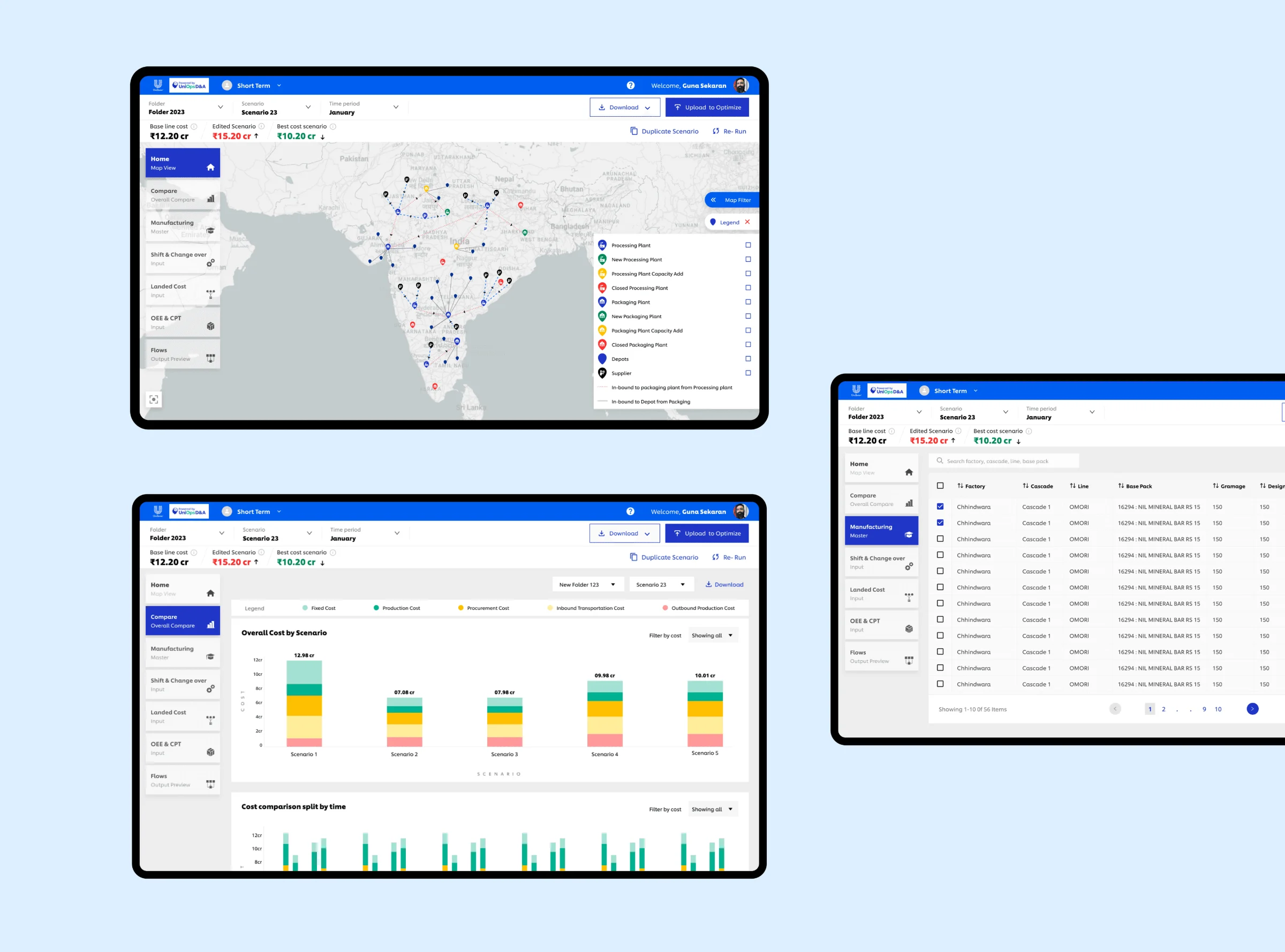
The map is the working canvas. The three-scenario cost strip is pinned in the header on every screen.
Why?Cost never leaves the screen, so the top need is always met. The map adds what a table can't: a fast way to sanity-check AI routes against a network planners know by heart.
Decision 02
Show only the AI-optimized plan.
Baseline, Edited and Best cost side by side.
Why?A single AI number asks for blind trust. The same number next to the planner's own baseline makes the gap concrete and checkable.
Decision 03
Export to Excel, edit, re-upload: the planners' existing habit.
Edit any value in place and recalculate instantly.
Why?Every round trip through a spreadsheet was a chance for errors to creep back in, which was the exact problem we were solving.
Every planner pain from the old cycle, the decision that answers it, and where it lives in the product. It condenses the stakeholder workshop board.
| Planner pain | Design decision | Where it lives |
|---|---|---|
| Days spent collecting and costing data | Upload baseline data, get costs instantly | Upload and instant cost |
| No way to know if a cheaper route exists | AI best-cost scenario shown against the baseline | Three-scenario view |
| Network invisible inside spreadsheets | Plants, depots and routes on a map | Map view |
| Hard to explain the "why" behind numbers | Drill down to any depot or plant | Location drill-down |
| Errors found only after export | Edit in the tool, recalculate instantly | Edit and refresh |
| No way to weigh options | Scenarios side by side | Scenario comparison |
Solution
Six features, in the order a planner moves through a cycle. Each one is tagged with the pillar it serves, so the thread runs on to the outcomes.
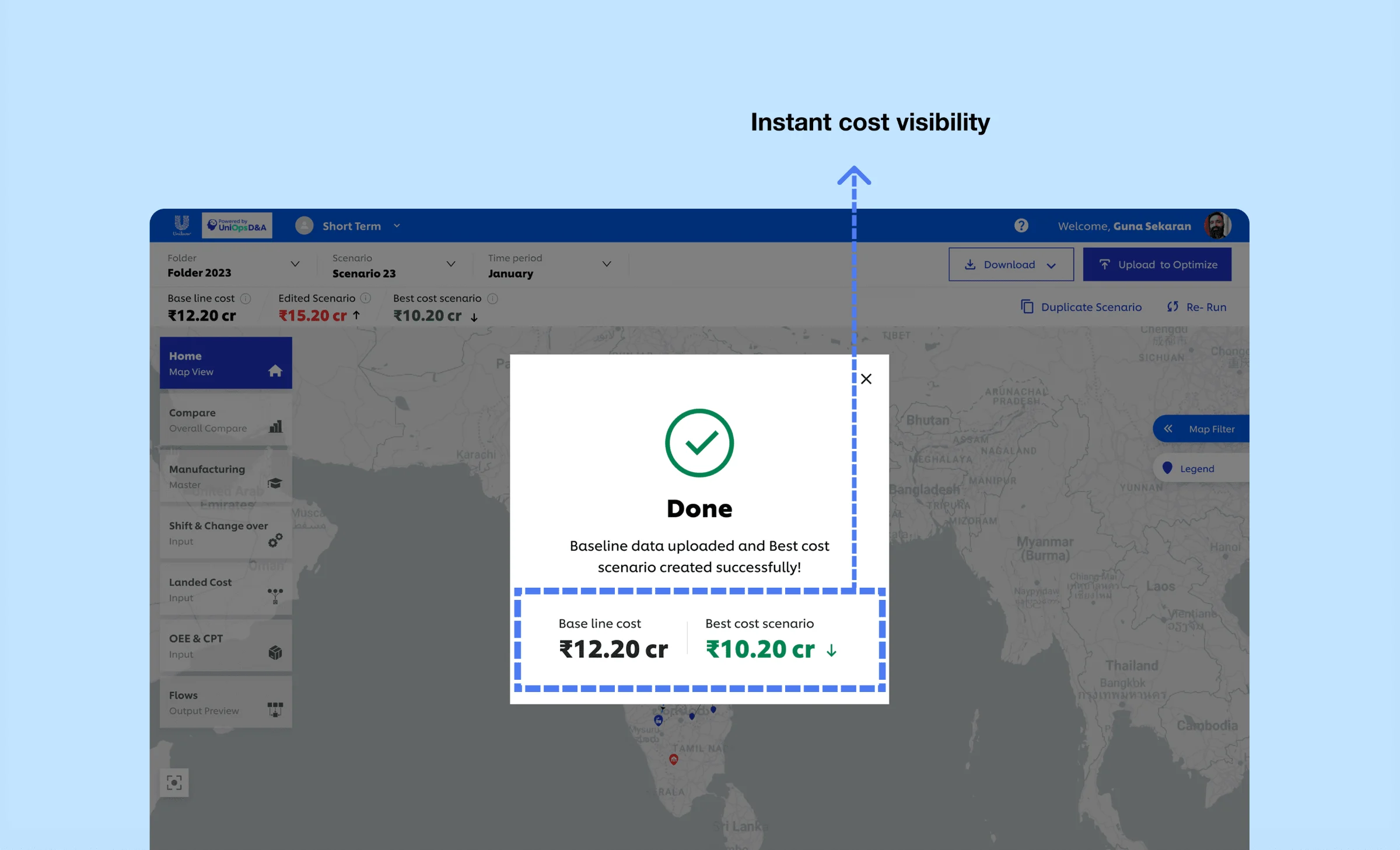
Upload data. See costs instantly. No spreadsheets.
Planners upload baseline datasets and see the overall inbound shipping cost right away. Manual spreadsheet costing is gone.
Impact → Less time on repetitive cost calculations. Planners move from collecting data to making decisions faster.
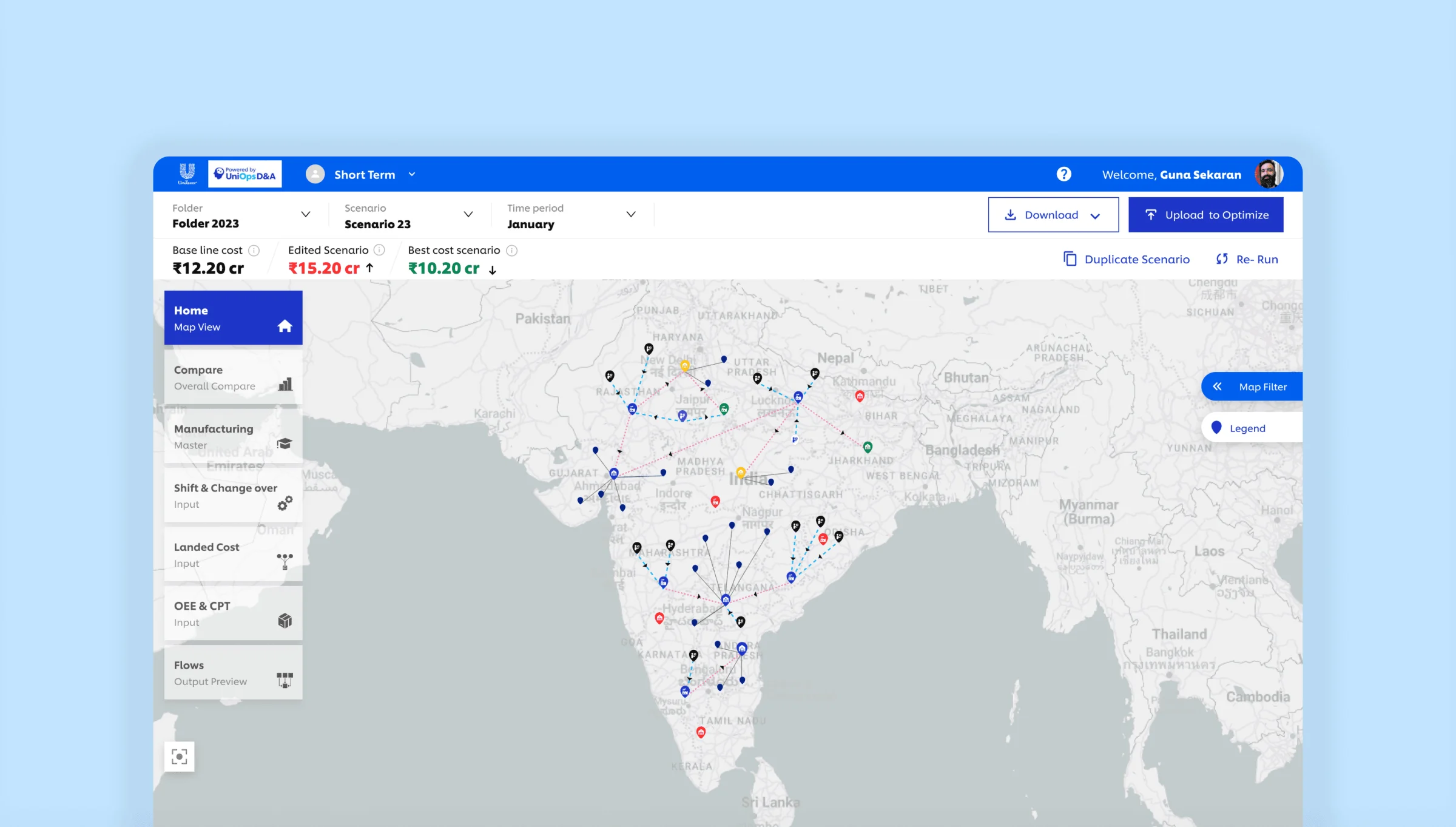
The network, finally visible, not just calculated.
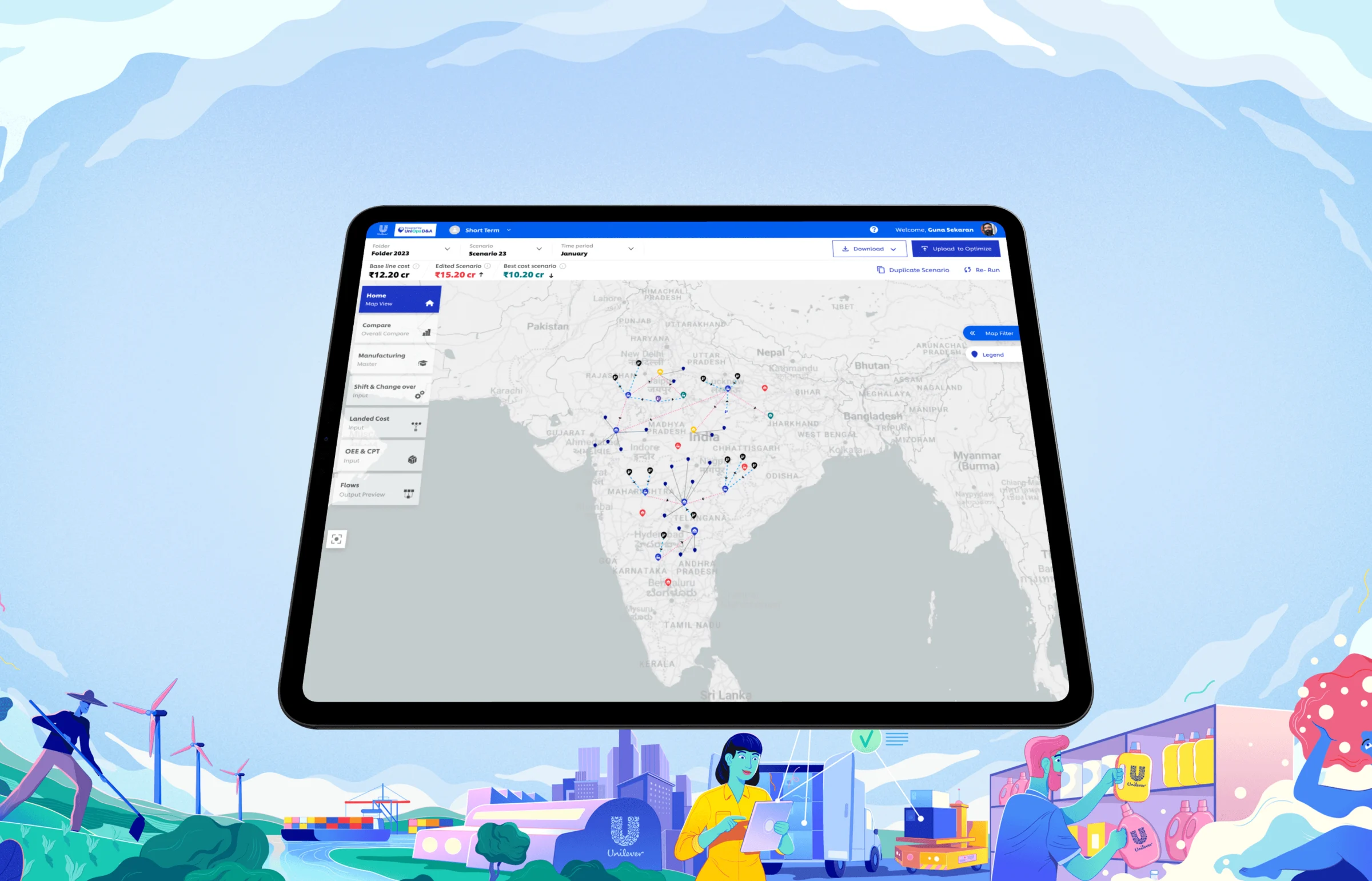
A map plots shipping plans across India, with plants, depots and routes as real network points and clear cost differences between them.
Impact → High-cost lanes are easier to spot, and route patterns are easier to trust.
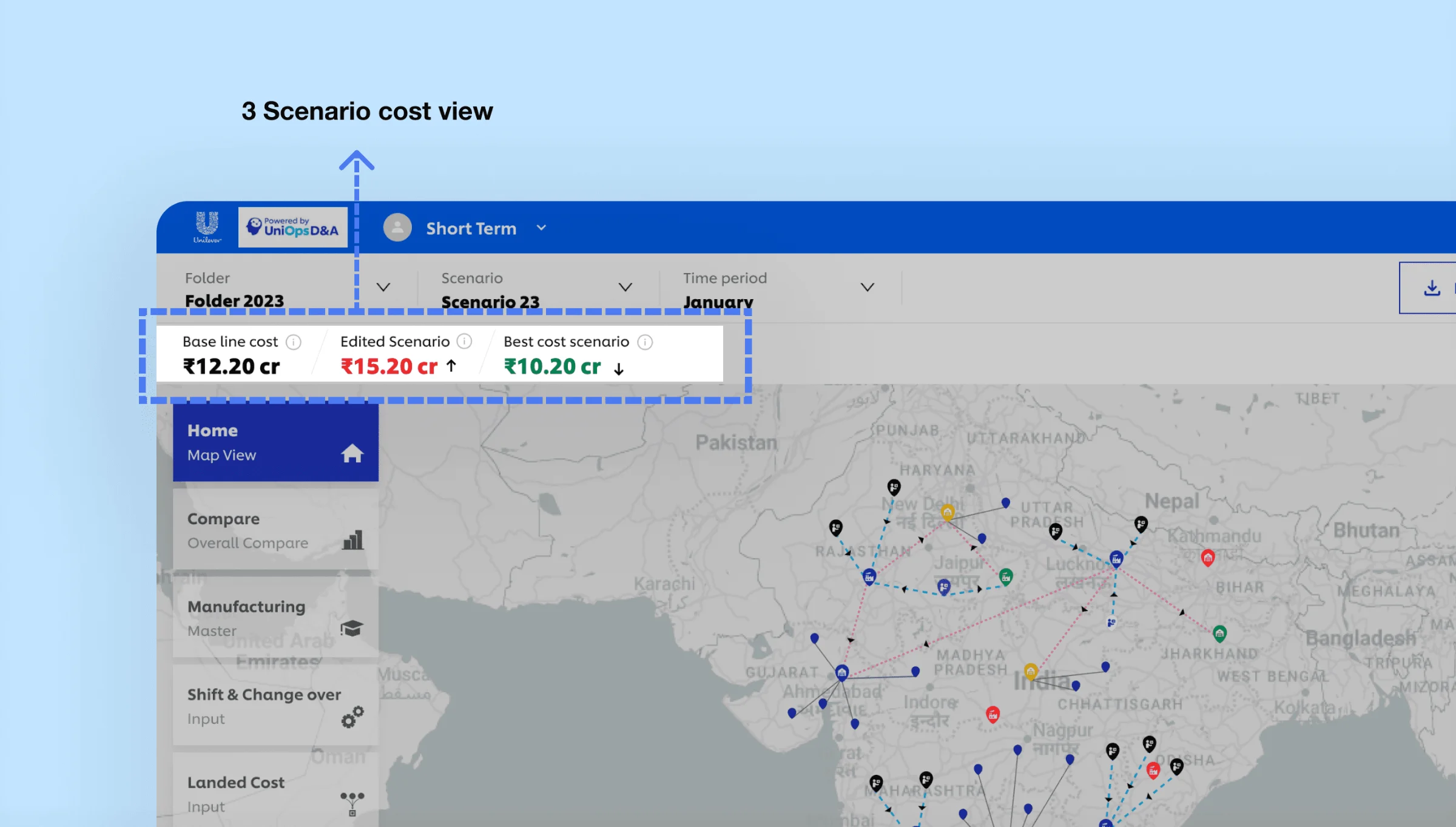
Three scenarios. One view. Cost optimization made visible.
Baseline, Edited and Best cost sit together in the header on every screen: the uploaded cost, the cost after manual edits, and the AI-optimized cost.
Baseline
₹12.20 crUploaded planEdited
₹11.60 cr↓ 4.9% vs baselineBest cost
₹11.10 cr↓ 9.0% vs baselineImpact → Faster comparison, more confidence in the AI output, fewer manual recalculations.
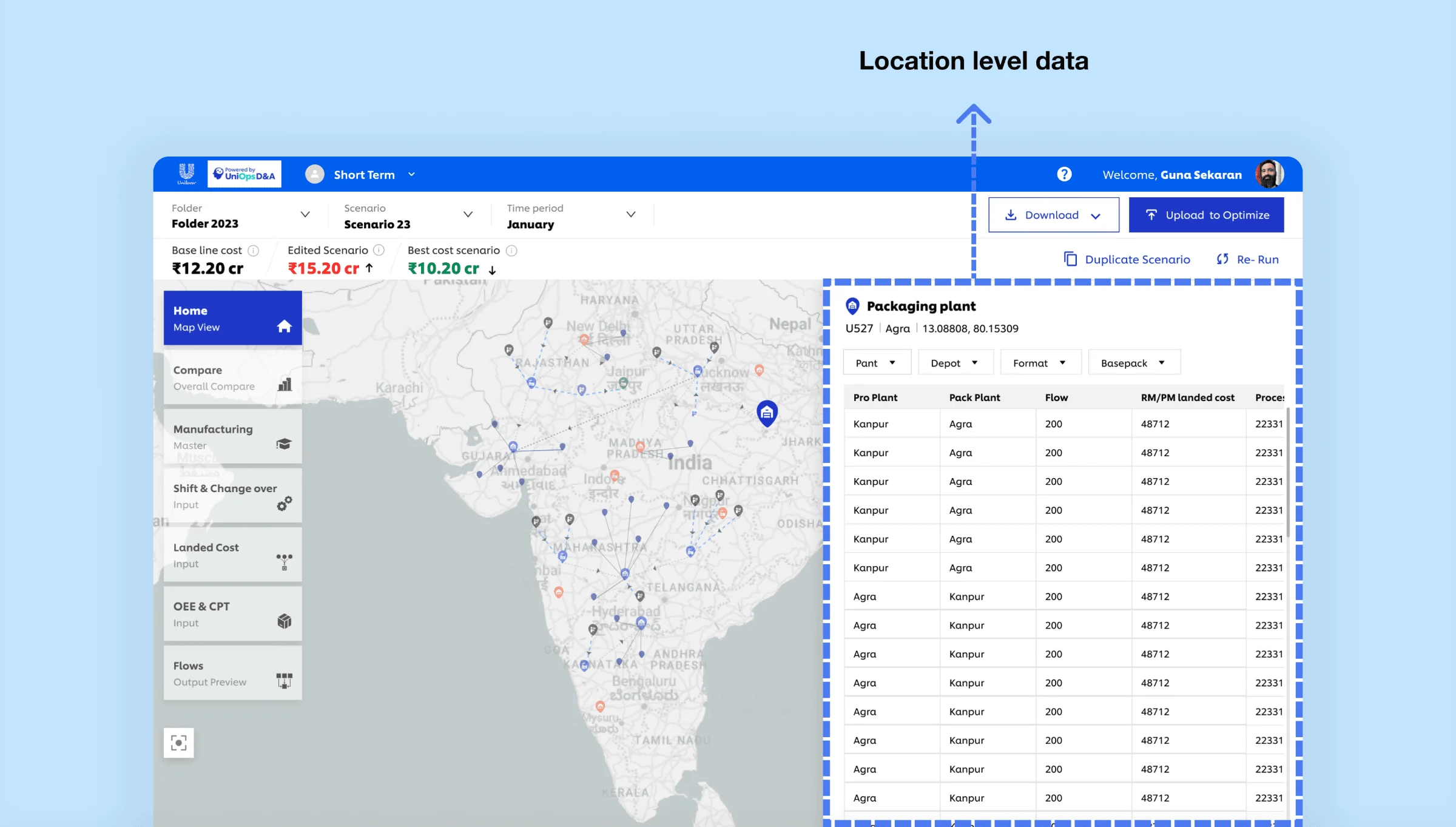
Every depot. Every plant. Drill down to check at the source.
Planners can open any depot or plant (processing, new or closed, packaging) and check the details behind the numbers.
Impact → Less manual cross-checking, and faster answers when planners need to explain the "why".
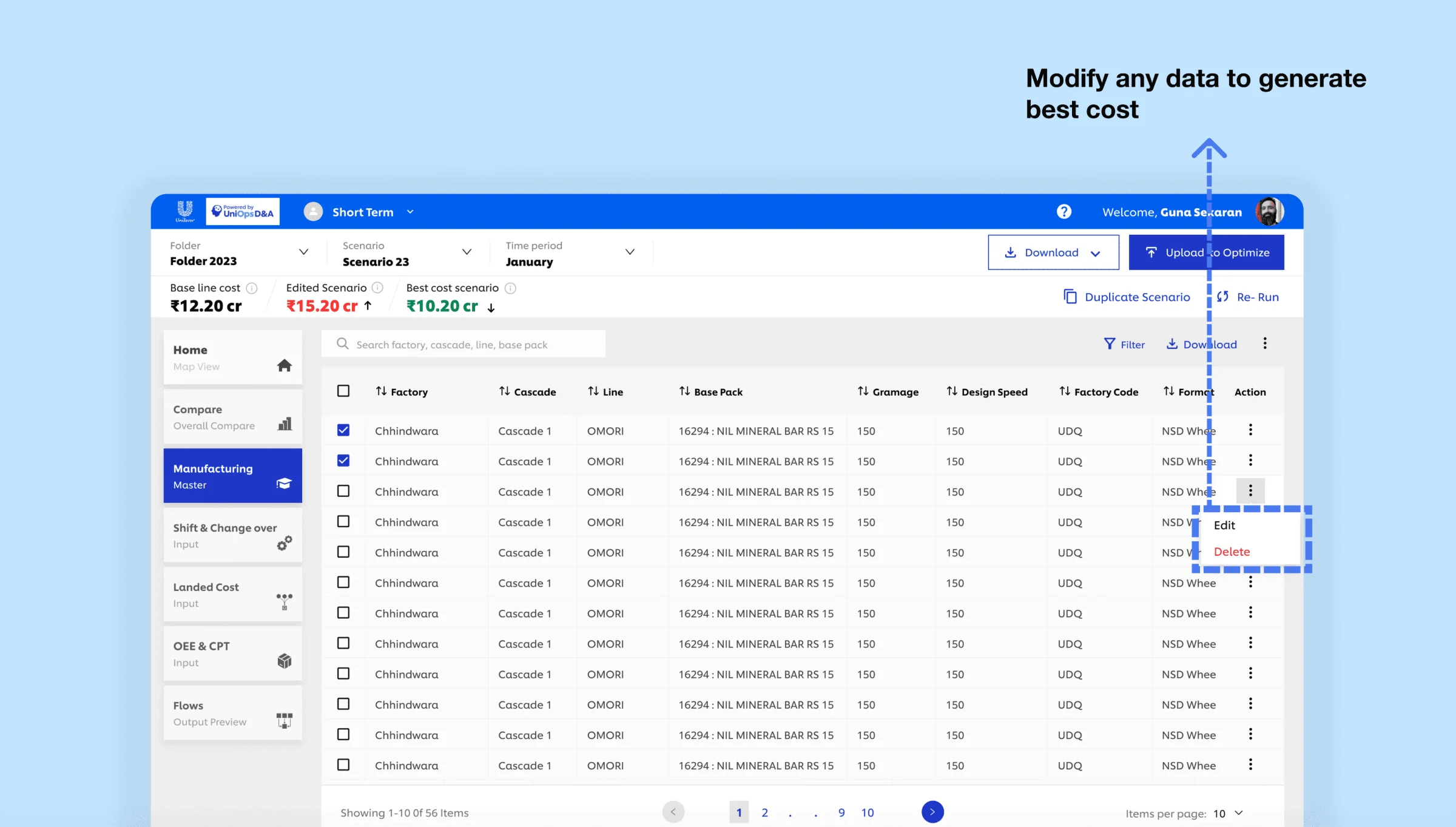
Edit the scenario. Refresh the cost. No rebuild.
Planners edit baseline data directly in the tool and get an updated Edited-scenario cost instantly.
Impact → Planners can test real-world adjustments without rebuilding the plan from scratch.
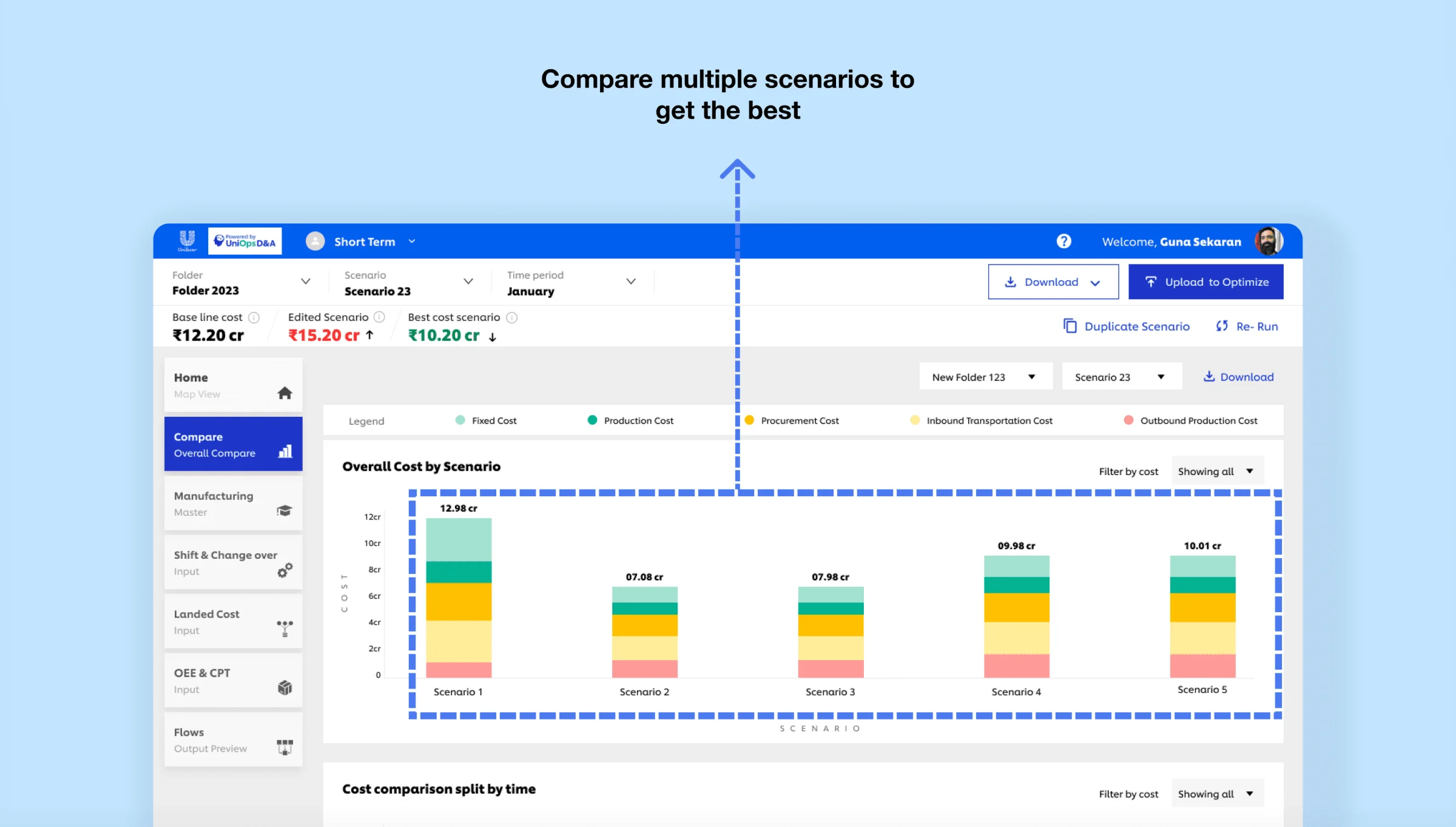
Put scenarios side by side. See what changed.
A Compare view shows the total cost of several scenarios side by side, broken down by cost type.
Impact → Planners choose between outcomes backed by evidence, not just between routes.
Outcomes
Each outcome maps to one design pillar, and says whether it was measured or projected.
SpeedMeasured
40–50%Shorter planning cycle (7 → 4 days)Instant cost generation on upload replaced the manual spreadsheet loop that used to take days.
MethodHow it was measured, and over how many cycles
OptimizationProjected
8–10%Potential cost savings identifiedThe AI best-cost scenario surfaced savings planners couldn't see before, and made the gap between the current plan and the optimal one visible for the first time.
MethodGap between the baseline and the best-cost scenario across X cycles, before planner edits. Realized savings, if known
ControlMeasured
60%Less reworkMap visibility and editable scenarios let planners check and adjust before committing, which cut the post-submission corrections that used to restart the cycle.
MethodPost-submission corrections per cycle, before and after. How they were counted, and over how many cycles
A quote from a planner, the product owner or a supply chain lead about the tool's impact
Reflections
What I'd keep
I learned to prove the core value early instead of trying to solve every edge case in the first release. Choosing what to defer, and designing around that gap, shaped this product as much as any screen did.
Quick stakeholder alignment and clear milestones moved the project forward in a complex enterprise setup.
What I'd change
Some outcomes here are estimates because the old cycle time wasn't tracked systematically. Next time I'd record the "before" state in week one.
Comparison, the map and editing gave planners enough to check the AI, but not to see why it chose a route. Even the top three cost drivers per route would have answered most of those questions without full explainability.
This project made me confident designing 0→1 enterprise products where complexity is high, timelines are tight and the AI can't do everything yet. The work was less about screens and more about shaping a workflow, aligning Product, Engineering and Data Science, and turning an optimization model into something planners would actually use.
More work
If you'd like more detail, get in touch, or see my other work below.
Open for opportunities
I partner with teams to turn complex problems into clear, human-centred solutions.